
Simple error handling in my specialist onboarding Power App
This article is part of a small series about my specialist onboarding app. The main use case is described here.
In the first version of my specialist onboarding app, error handling is intentionally simple. I do not yet return detailed technical errors or implement centralized logging.
What I do want is one predictable behavior. The flow should always return either success or error to the Power App.
To achieve this, I implemented a small pattern in the flow that ensures a consistent response back to the app.
The pattern
To keep things simple, I use a basic Try/Catch structure implemented with two scopes in the flow.
The Try scope contains the actual logic of the onboarding process. It creates the user account, adds the user to the appropriate group and sends the notification email.
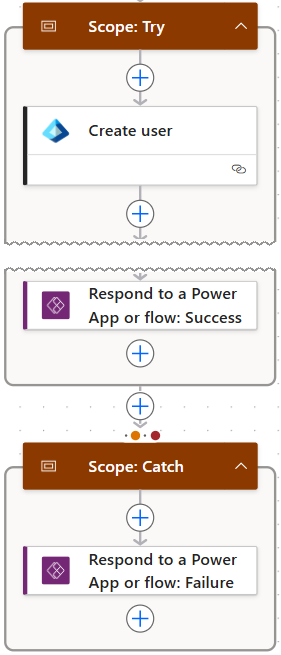
If all actions succeed, the flow returns a success response to the Power App. If any action inside the Try scope fails, the Catch scope runs instead and returns an error response. This ensures that the flow always returns a predictable result to the app. Both paths use the Respond to Power App action to return the result.
In the Power App, the response from the flow is stored in a variable when the flow is triggered.
Set(flowResult, CreateSpecialistAccount.Run(...));The result is then displayed in a popup. The message itself is already prepared in the flow using the Respond to a Power App action, so the app does not need to interpret the result. The Text property of the label inside the popup is set to:
flowResult.messageThis keeps the logic in the app minimal while the flow remains responsible for returning a consistent response.
Possible improvements
The approach I described here is intentionally simple, just like the rest of the app in its current version. If the solution evolves, the error handling can be extended. For example, the flow could return specific error codes, include more detailed messages or log errors in a central location. For the current version of the app, this lightweight approach works well and keeps both the flow and the app easy to understand.